Word Publisher / Publisher Tab
Publisher Tab
 Excel
Lists the excel reports that have been created.
 Filters
Apply filters to the excel report to display those values in your word report, for example Income.
Double click the filter name to expand.
A second click will revert it back to not selected at all.
 A lock indicates your selection.
 Displays when a filter is locked.
 Time Series
Click the year to expand to display the months.
A lock indicates your selection.
Dataset fields
Display a list of dataset fields to drag and drop into the word document.
Bookmark
Displays all bookmarks which have been added to the report.

ID Unique number which is given at the time of bookmark creation. This ID is unable to be changed.
Dataset Indicates the dataset where the excel report has come from.
Name The bookmark name. This can be changed so that each report is easily identifiable, especially if you have multiple reports throughout your report.
Execute Indicates which bookmark will be executed when publishing. Untick those bookmarks that you do not wish to publish.
Right mouse click will allow you to select or deselect all bookmarks.
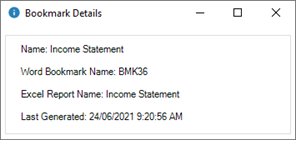
Details Displays the details of the bookmark.
Menu Items
Right-mouse click on the bookmark to present the menu options
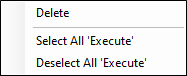
Delete Delete the bookmark.
Select All 'Execute' Select all bookmarks that will be published.
Deselect All 'Execute' Deselect all bookmarks, then select which bookmarks you want to publish.