Word Publisher / Overview
Word Publisher is a native Microsoft Word add-in that enables users to build live and dynamic reports and publish organisational documents such as Annual Reports, Financial Reports, Management Reports and Executive Presentations easily and efficiently by utilising existing/preconfigured Excel/Excel Publisher reports.
Users can then use Microsoft Words functionality like cover pages, table to contents, headers and footers, texts, and images to produce a published document. We can switch over reports from portrait to landscape mode and in addition you can use the charts and tables that come from Excel.
The publisher panel (located on the right-hand side) is embedded into Microsoft Word and displays a list of Excel reports that the user can drag and drop into the word document.
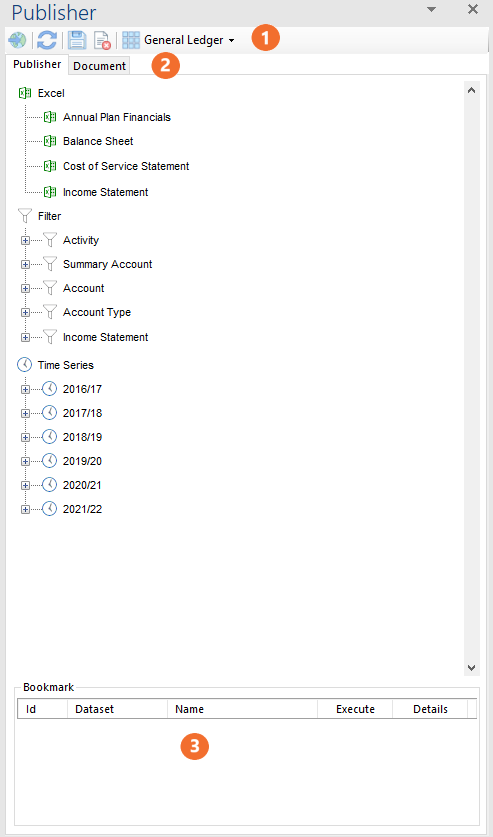
 Publisher Ribbon
 Publish or preview the Excel report data in real-time.
 Refresh Publisher.
Protect Ranges from Changes
 Save your generated report as a template for future use.
 Delete the generated report.
 Select the relevant dataset to bring in required excel reports.
 Publisher and Document Tabs
Publisher tab provides access to the excel reports created as well as the standard Performance filters and time series parameters.
Document tab provides access to saved reports.
For more information, refer to the Publisher Tab or Docuemnts Tab
 Bookmarks
Each Excel report creates a bookmark in word. This allows us to locate and navigate to the reports easily.