Excel Publisher / Overview
Excel Publisher is a native Microsoft Excel add-in that enables users to build live and dynamic reports.
Excel reports can be used independently or include them within organisational documents such as Annual Reports, Financial Reports, Management Reports and Executive Presentations easily and efficiently by utilising Word Publisher.
The publisher panel (located on the right-hand side) is embedded into Microsoft Word and displays a list of Excel reports that the user can drag and drop into the word document.
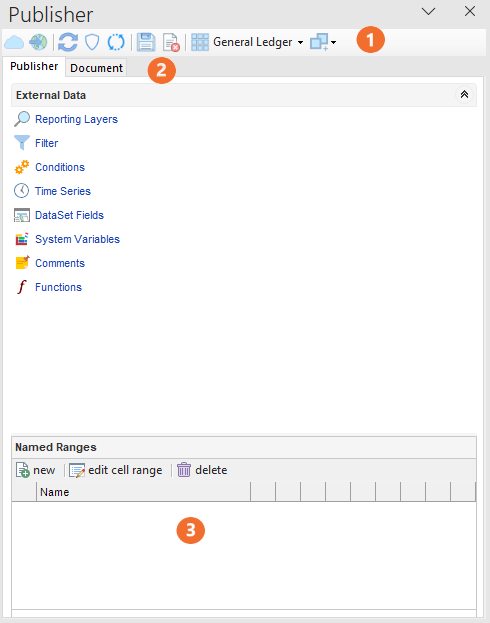
 Publisher Ribbon
 Connect/disconnect
 Publish or preview report in real-time.
 Refresh Publisher.
Protect Ranges from Changes - prevent user from accidentally applying filters to ranges. The user must click edit before adding/removing filter(s) to a range when the "Range Protect" is on.
Search and Replace comments - Find text in Excel's comment and replace it.
 Save your report as a template for future use.
 Delete the report.
 Select a dataset that the report data will be based on.
 Add Dataset - Link a dataset for a multi dataset report.
 Publisher and Document Tabs
Publisher tab provides access to the standard Performance layers, fields, filters and time series etc. to create the report.
Document tab provides access to existing saved reports.
For more information, refer to the Publisher Tab or Documents Tab.
 Named Ranges
Displays the ranges created. Each Range can have different filters, conditions, dataset fields and Excel functionality such as a SUM formula.
For more information, refer to named ranges.