Introduction to the Navigation Tree
The Navigation Tree is used to manipulate the data in the Data Browser (to the right on the Navigation Tree window).
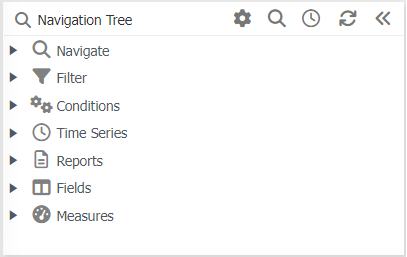
Navigation Tree buttons
 Configure -
Configure how the navigation tree displays information such as tolerances, whether you want to have the navigation tree functions automatically expanded etc.
Configure -
Configure how the navigation tree displays information such as tolerances, whether you want to have the navigation tree functions automatically expanded etc.
 Find -
Search or find Alpha and/or numeric descriptions such as cost centres/accounts, and filters within the navigation tree.
Find -
Search or find Alpha and/or numeric descriptions such as cost centres/accounts, and filters within the navigation tree.
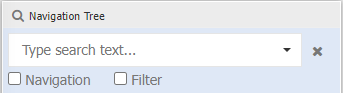
Ensure 'Navigate' and / or 'Filters' are selected first before entering text. If no options a selected, the search will occur for 'Navigate' and 'Filters'.
 Time Series -
Changes the time series of all widgets in your Data Browser/dashboard. This is useful to see multiple widgets all at one time series.
Time Series -
Changes the time series of all widgets in your Data Browser/dashboard. This is useful to see multiple widgets all at one time series.
 Refresh -
Reverts the Data Browser/dashboard to the original saved state that it is in. This is helpful if you have made changes you do not wish to save and saves time for you to close the tab and re load it again.
Refresh -
Reverts the Data Browser/dashboard to the original saved state that it is in. This is helpful if you have made changes you do not wish to save and saves time for you to close the tab and re load it again.
 Minimise -
Minimise the Navigation Tree to give you more screen real estate.
Minimise -
Minimise the Navigation Tree to give you more screen real estate.
Right mouse click menu
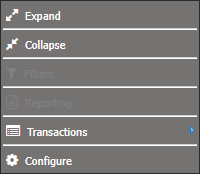
Expand Expand the node you have selected.
Collapse Collapse the expanded node back to their original setting.
Filters Becomes visible when you right click on either the Filter heading or somewhere in the expanded range of the Filters. These are used to filter a certain option of data in the Data Browser e.g. only seeing income.
Reporting Becomes visible when right click on either the Reporting heading or somewhere in the expanded range of the Reporting subheadings. To use it you need to expand the folders to find the report you want to select. This right click then gives you the option to open, delete or edit the report.
Transactions Becomes visible when you have expanded the Navigate heading as far as you can, and then clicking on one of these expanded options. Here you can choose either budget audit or GL transactions.
Configure Opens a pop-up that allows you to have some of the navigate option automatically expand one layer as well as set tolerance levels for the Navigation Window.