Introduction to MAGIQ Cloud
MAGIQ Performance is made up of two key functional groups – Budgeting and Reporting.
Selecting one of these options via the main left-hand navigation menu launches the respective functional tab as shown below:
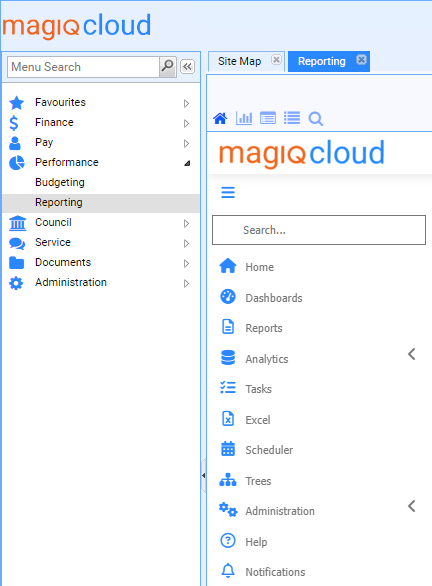
To make the functional tab larger and easier to use, you can minimise the navigation windows by clicking on the icons  and
and 
To mark a functional tab as a favourite
- Open the relevant application.
- Click the favourites icon in the top right-hand corner
 .
The star will turn blue, and place the application under the favourites heading in your left-hand menu.
.
The star will turn blue, and place the application under the favourites heading in your left-hand menu.
To have applications start automatically
- With the favourite star blue, click it again to turn it yellow
 .
.
Tabs will launch in order they appear in the favourites heading and the top favourite will become the left most tab and the one that will display on launch. If you want to change this, you will need to unfavourite all tabs and then re-favourite them in the order you want, with the first one being the one that will open when you launch/refresh the screen. Note there must always be at least one yellow star.
To open performance
If budgeting or Reporting has not been marked as a favourite, then choose Performance and select either Budgeting or Reporting.
Refer to Budgeting and Reporting overview for more information.