Functions Tab / Edit Mode
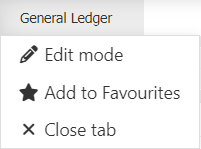
To display the functions/tab buttons
- Hover your mouse over the function tab, for example 'General Ledger'.
- Click

Edit Mode
Allows you to Save reports, specify a global time series, zoom to a layer etc.
Displays the following icons:


Add to Favourites
Add the function tab as a favourite. Everytime you open MAGIQ Performance that function will automatically load.
 add as a favourite.
 is already a favourite.
Favourite Reports
- Open a report from the Reports function.
- Hover your mouse over the tab.
- Click
- Click add to favourites.
Close Tab
Closes the relevant tab.
Tip
You can have multiple tabs open at one time.
To exit edit mode
If you do not wish to have these options visible.
- Click
 found on the far right hand side.