Finanical Planning / Business Rules
Business Rules are the formulas/calculations used to apply period movements for percentage allocations, inflation etc for future year planning.
They are written at a folder level in the calculation tree and filter through all codes mapped underneath to save having to rules for every account code.
Selecting an item in the calculation tree, displays the business rules on the right. For example, Road
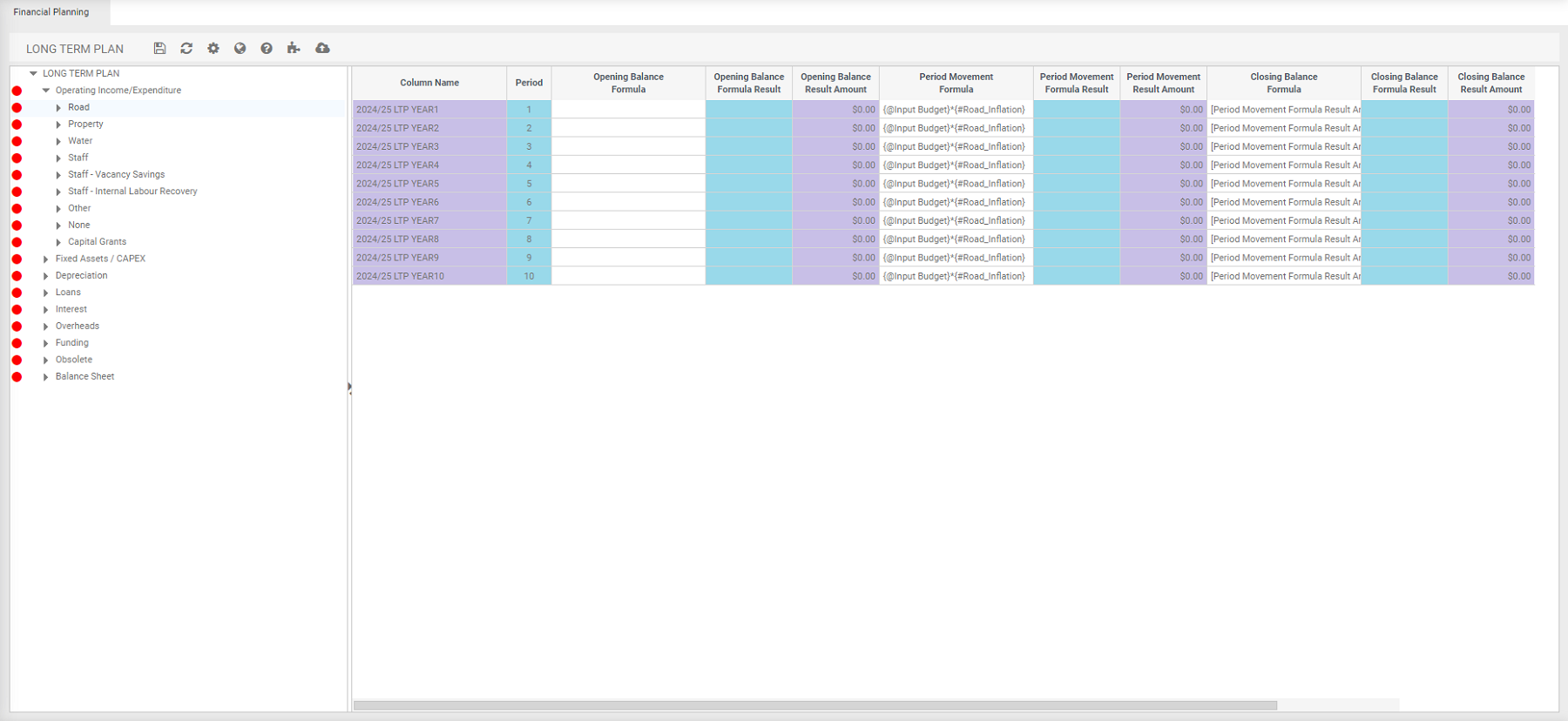
When clicking on each calculation, the assumption changes to match.
Opening Balance and period movement formulas are working columns. Anything with an @ symbol is a variable.
Closing balance amount is written to the database and what value will be written into the budget when you publish this model.
When published, it writes into its own budget name and set of fields that we can report on in the dataset.
To view the variable
- Click
 .
.
Applying Inflation
In budget entry (the out years). Managers enter the uninflated amounts (current dollars) and assumptions are used to calculate.
Click  .
.
Business Rules right click menu
Cell Editor - Ability to enter values, create/maintain formulas.
Calculate - brings through values based on the budget entry screen. Always trying to both sides of the journal entry. For example, depreciation and depreciation expenses.
Columns - Select the colour of the columns, hide or show hidden columns.
Fill Up - Copy data up the column.
Fill Down - Copy data down the column.
Copy Rules - Copy a business rule.
Paste Rules - Paste the business rule.
Import from Excel
Export to Excel
Get Default Formula
Set as Default Formula
Save
Delete
Different Areas of the Calculation Tree
The calculation tree is in th below order because we already know all the income, costs or expenditure that goes into which cost centre. Then we can calculate what the overhead allocations are.
Operating Income/Expenditure
All income, costs or expenditure.
Fixed Assets / CAPEX
Capital Budget is designed as a "feeder" into financial planning. Based on what flows through to be the balance sheet/capital addition codes.
Within capital budgeting, project details including a mapping to an account and calculation drivers will calculate the flows from capital expenditure, for example, depreciation based on useful life.
Amounts entered into Capital Budgeting are in uninflated as the system will calculate the inflated amount before it performs its calculations.
Accumulated Depreciation - Looks a little more complicated than the operating budget side, due to looking at the balance sheet code. We need to track the balance year on year and roll totals forward.
Lets use an example to explain:
Looking at 'LTP Year 1' – we need to know what the opening balance is at the start of the model.
In 'Period Movement Formula', right click and select cell editor.
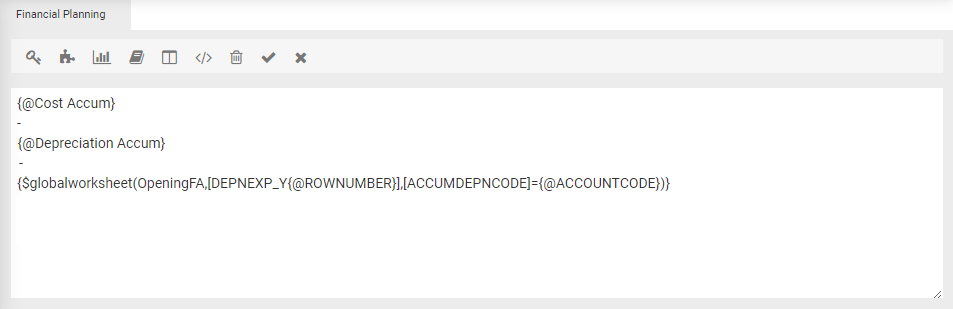
$global – refers to a global worksheet.
For the global worksheet called ‘Opening Fixed Assets’ (OpeningFA,
SUMIF Accumulaed Deperection code [ACCUMDEONCODE]
= the current account code {AACCOUNTCODE}
Then return the depreciation expense year [DEPNEXP_Y
Depreciation
Is the expense side of the equation.
Loans
Uses the global worksheet for any existing loans at the start of the model or capital budgeting will also calculate loan movements, repayments, interest based on any loan funded projects.
Interests
Interests expense will come from existing loans or loans drawn down from capital.
Overheads
Varies from site to site.
For Example:
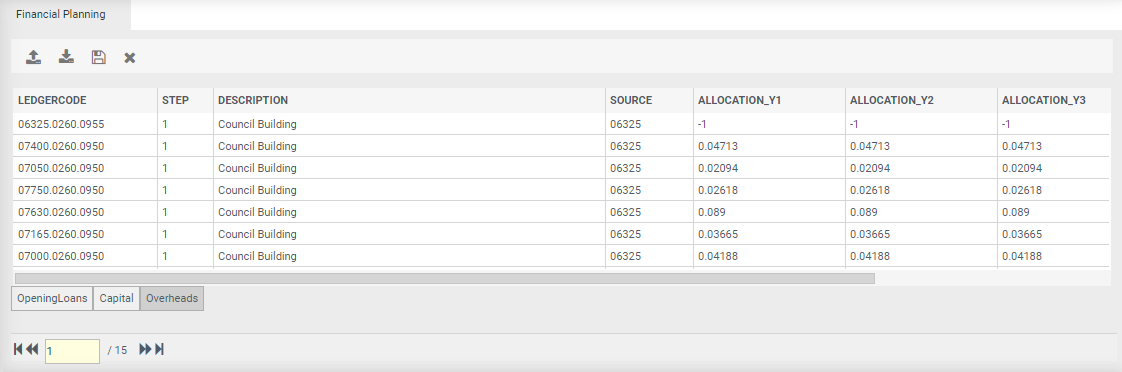
Setup a variable that will calculate everything that we already know exists in 06325 ('Source' column or sometimes called 'Allocated Cost Centre') and distribute out to the cost centres ('ledger code' column) based on the Percentage Allocation (Allocation_Y1' column).
Referring back to business rules, You can use a series of variable and global worksheet lookups to say 06325. For example:
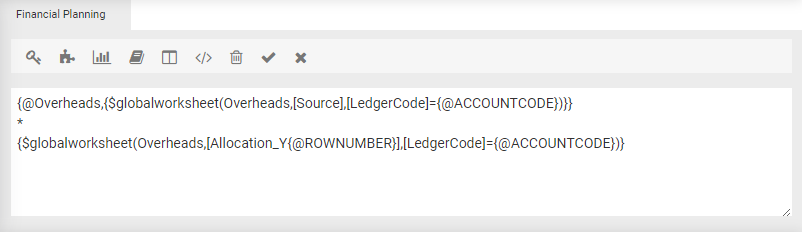
Picking up the [Source] where the current @ACCOUNTCODE = LedgerCode and parsing through 06325 from overheads globalworksheet into the overheads variable.
Funding
Calculate everything in the income statement as well as capital so we know our full costs of the program right across the 30 yrs, we can now calculate what our rates requirement is.
Balance Sheet
Based on everything else calculated. Calculate the remainder of the balance sheet passing everything else through the balance sheet such as cash and equity movements which means we are calculating the full trial balance rather than just the operating budget.
Once built, we are just adjusting inputs. We have setup business rule on the right. We can either map in new codes or adjust our costs through our operating or capital budget, once adjustments are made we can publish the model.