Zoom To
Only applicable for analytics such as documents, general ledger, assets etc.
Allows you to display a specific level/layer for the entire structure in multiple aspects, for example you may be viewing your organisation from a Cost Centre aspect.
Zooming to the Account Group layer will display all the Account Groups for the Cost Centre(s) such as Employee Costs and Materials.
Either use the zoom to button at top of page or widget, or right click. Both ways of will show the currently zoomed layer as well as altering all open widgets in the tab.
To go back a level, either use the zoom to, or double click 'grand total'
Zoom To menu structure
Every layer that is apart of the navigation is also apart of the filter structure. However, some layers are only apart of the filter structure and not necessarily apart of the navigation structure. For example,
Above the line is apart of the nagivation structure and or filter layers. Below the line is only apart of the filters.
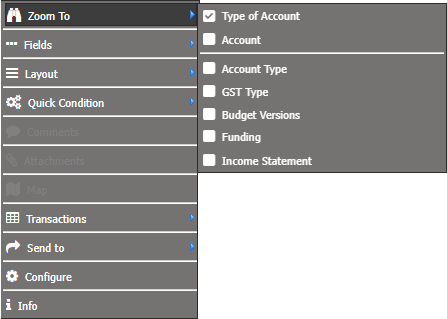
The only time you would have a filter only would be for load times. Purely for design choice, that you would not have a budget version listed at every level.
Zoom To in Transactions Widget
??