Data Browser / Widget - Alerts
Alerts are indicators to show whether particular items in your Dataset(s) need attention.
Alert are created by your system administrator using a SQL query, which could be querying the Budgets or another database.
The following are examples of Alerts that you could have set up:
- Cost Centres that are over a certain percentage of their budget.
- Employees with more than a certain amount of weeks of annual leave.
- Users that are currently logged into the system.
- When a user last logged into the system.
- When Overtime goes over a certain amount.
Widget button - Configure
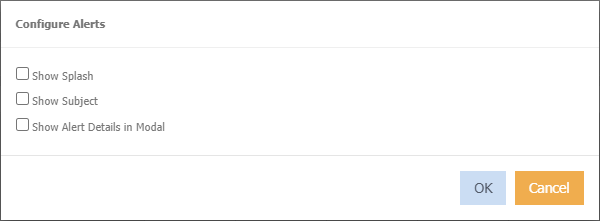
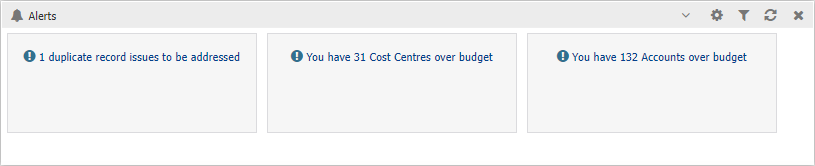
Show Splash
Displays the alerts as:
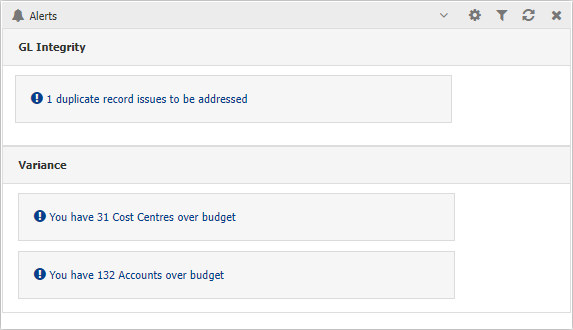
Show Subject
Displays the alert subject/category heading:
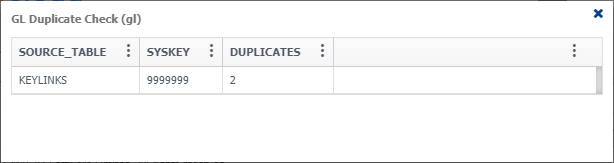
Show Alert Details in Modal
Display the alert details in a popup, instead of in the widget window. For example
To add an alert
- Right click in the widget window.
- Choose Alerts > Maintain
- Select which alerts you want visibility on.
Viewing Alerts
To view more details of an Alert click on the Alert and the window will change to reveal information that the Alert's is referring to.
For example, if you have an Alert that shows any Cost Centres that are 20% over budget then this window will indicate those Cost Centres.
Click  to go back to your list of alerts.
Click  to export the information to excel for manipulation.
Click  to use column filtering and sorting on the detail alert grid, if required.