Budgeting Overview
Budgeting allows access to a live budget to be updated on demand. Having the budgets readily available and not having an offline budget needing to be passed around users to edit means real time editing is able to be made in a simple accessible way.
The Budgeting function is found under:
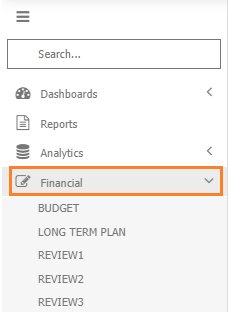
5 budgets (BUDGET, REVIEW1, REVIEW2, REVIEW3 and LONG TERM PLAN/TEN YEAR PLAN) come standard with MAGIQ Performance, the budgets have separate names as they are independent of each other.
Opening a budget opens in the data entry window.
No budget will be present until you navigate down to the budget level.
Budget
The Annual Budget.
BUDGET can be renamed to make it more meaningful for yourselves.
To change the name refer to XXX section.
Budget information will display once a cost centre is chosen.
Note
Changes made to the Review1, Review2 and Long Term Plan will not impact your Annual Budget.
Review1
Used for forecasting.
Select your cost centre.
First 3 months or 1st quarter of the year greyed out and the following months can be entered. Typically this is done at the end of quarter 1 to reforecast your final year end position.
Refer to budget modelling to either copy the annual budget into the rest of the year as a starting point, or importing and exporting different numbers.
You are doing the review/forecast in the same/current year you are in/have selected.
Review2
6 months of actual and the remaining 6 months of forecasting.
Review3
9 months of actuals and last 3 months of budget forecasting.
Long Term
Also known as Ten year Plan.
Long term figures. - Allows you to put numbers in for future years.