Permissions / System
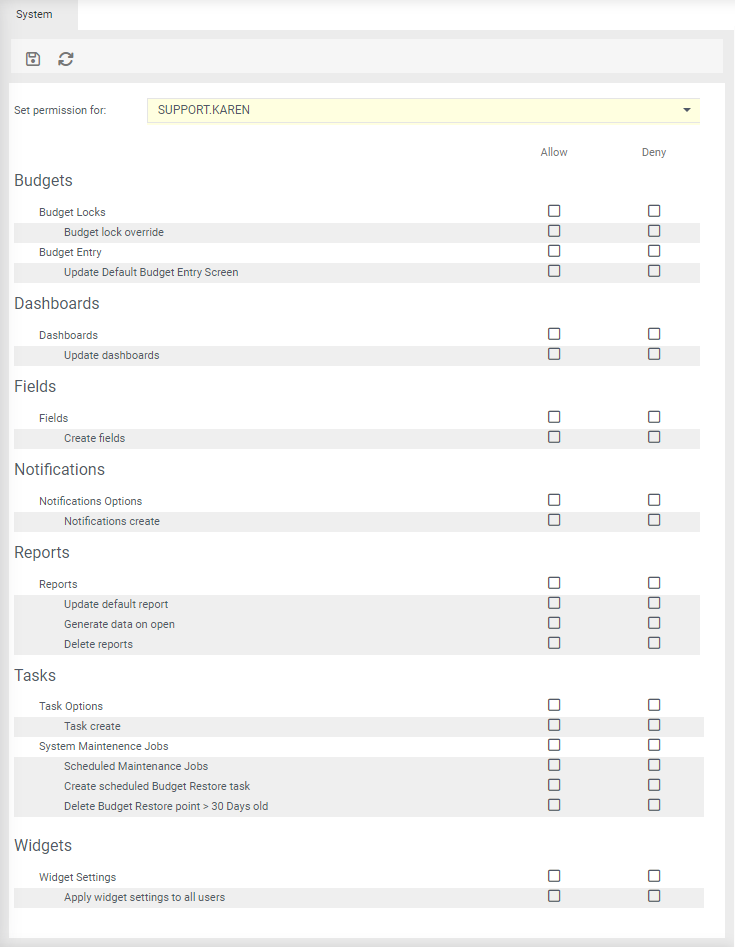
System Permissions are global permissions that allow access to system functions.
Budgets
Budget Lock Overwrite Allow the user to overwrite budget locks.
Update Default Budget Entry Screen Enables the format fields menu option which will allow formatting to be set for the default screen. Budget entry screen must be refreshed/budget tab closed and reopened for permission to take effect.
Dashboards
Update Dashboard Allow or deny users from making changes to dashboards (The save button will be hidden).
Fields
Create Fields Allow or deny users to create new fields without having access to the control centre.
Notifications
Create Notificatons Allow or deny users to create notifications.
Reports
Generate Data on Open Allow the user to set 'Generator Data on Open' when saving a report. Every time the report is run, it will take time to load as data will be extracted from your source system eg Oracle (using the Generator) and be reimported into the system automatically. When the report is finished loading, it provides up to date data.
Update Report default Report Allow the user to 'Set as default report for all users' when saving a report.
Delete Report Allow the user to delete a 'Shared with Everyone' report.
To Apply permissions
- Select the user from Set permission for
- Tick either relevant permission
-
Click
 to save.
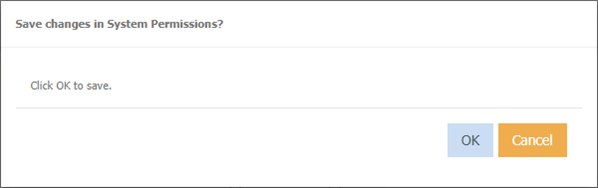
The below message will display
-
Click OK
Tasks
Create Task Allow or deny users to create tasks.
Scheduled Maintenance Jobs Allow or deny users to create system tasks such as Clear SQL Logs, Clear System Logs, Clear Debug Logs etc
Create Scheduled Budget Restore Task Allow or deny the user to create tasks for budget restore.
Delete Budget Restore Point > 30 days old Allow or deny the user to create a delete budget restore point greater than 30 days old task.
Widgets
Apply widget settings to all users