Administration / Generator
Import information/data from your source system into your dataset.
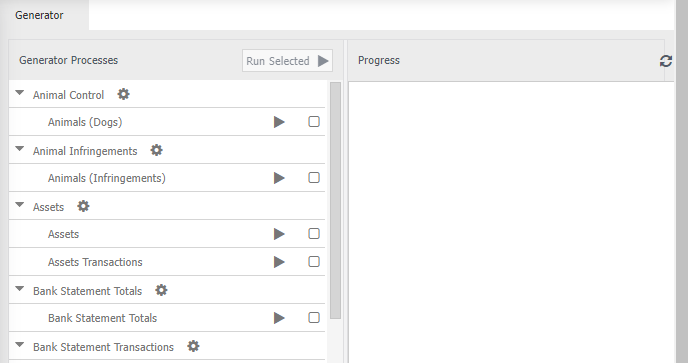
The generator is the link between an external system and MAGIQ Performance. It processes the data to give you the ability to create useful reports and budgets.
The generator can run on demand or have it update data if there have been any changes in your enterprise system since it was run overnight.
Run on demand
Note
Ensure multiple users are not running the generator at once as the generator will continue to trigger events, and its possible that you will get strange figures until the generator has run successfully.
- Click on the black triangle next to any of the options to automatically run it for those options selected.
If you want to do more than one, or all:
- Select the box next to the process you want to run.
- Click

When you run the generator, you will see in the window to the left of your selections the Progress window.
While the generator is running you can monitor the progress with the progress bars at the bottom of the window.
The generator will be working in here and you can monitor the progress with the progress bars at the bottom of the window.
The more selections you have chosen the longer it will take overall, so it is recommended just to choose the options that will be affected by any changes you have made.
You can see which option is currently processing as it will have the spinning cog next to the the option selected. This should roll down your selection onto the bottom one.
You should not have to run the process, much if at all as since it is run overnight the information will be close to fully up to date.
Run overnight
Windows scheduled tasks can be setup so the generator runs overnight.